

UNIT 8.1: CAN YOU HELP ME WITH SOMETHING?
Marie: Bob, can you help me with something?
Bob: Sure.
Marie: I’m trying to print the file, but the printer won’t work.
Bob: Push the green button on the printer.
Marie: What? Why?
Bob: To turn it on. It won’t print unless it’s on.
Marie: Oh right. Silly me. Thank you.
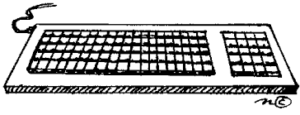
Paul: Hey Bob. My laptop crashed, and I can’t get it to do anything. I type on the keyboard and nothing happens.
Bob: Stick this here.
Paul: Why?
Bob: To restart the computer.
Paul: Are you sure? Okay thanks.
Cheryl: Bob, I could use a hand with something.
Bob: What is it?
Cheryl: Somebody sent me an email, but I think it has a virus in it.
Bob: Don’t open the attachment. Click on the no virus icon on the toolbar.
Cheryl: Why?
Bob: To clean the computer and stop the virus.
Cheryl: Thanks.
Marie: Bob, can I ask you another question?
Bob: I’m sorry, but I can’t get any work done with all these questions. Please, I have some very important stuff I need to finish right now!
Cheryl: Very important stuff?
Bob: How can I help you?
1.Pronunciation (7mins)
– Role play: Teacher and student take turn to read
– Listen and repeat: Student repeats after the teacher
2.Vocabulary Check (7mins)
 |
 |
 |
 |
 |
 |
 |
 |
 |
 |
 |
 |
 |
 |
 |
Do you think that helping someone is important?
…………………………………………………………………………………………………………………………………………….
How can we turn on electronic equipment?
…………………………………………………………………………………………………………………………………………….
How long have you been using a laptop/desktop?
…………………………………………………………………………………………………………………………………………….
Are you good at it?
…………………………………………………………………………………………………………………………………………….
What is the meaning of the abbreviation “Caps Lock” on the keyboard?
…………………………………………………………………………………………………………………………………………….
When should we restart our computer?
…………………………………………………………………………………………………………………………………………….
What is a PC?
…………………………………………………………………………………………………………………………………………….
What is “important stuff”?
…………………………………………………………………………………………………………………………………………….
What does it mean when someone said my laptop crashed?
…………………………………………………………………………………………………………………………………………….
Are you good at typing?
…………………………………………………………………………………………………………………………………………….
3.Comprehension Check-up (7mins)
Who’s asking for help?
…………………………………………………………………………………………………………………………………………….
What is Marie trying to do?
…………………………………………………………………………………………………………………………………………….
What is her problem?
…………………………………………………………………………………………………………………………………………….
What did Bob tell Marie?
…………………………………………………………………………………………………………………………………………….
The printer only prints when …. ?
…………………………………………………………………………………………………………………………………………….
Whose laptop has crashed?
…………………………………………………………………………………………………………………………………………….
What did Paul do to his laptop?
…………………………………………………………………………………………………………………………………………….
What does Cheryl think about the attachement in her e-mail?
…………………………………………………………………………………………………………………………………………….
What is Bob’s advice for Cheryl?
…………………………………………………………………………………………………………………………………………….
Who is in trouble in this conversation?
…………………………………………………………………………………………………………………………………………….
Is Bob an enthusiastic helper?
…………………………………………………………………………………………………………………………………………….
4.Draw Connections (7mins)
Do you often help other people?
…………………………………………………………………………………………………………………………………………….
If yes, how do you help them?
…………………………………………………………………………………………………………………………………………….
Are you good at using a computer?
…………………………………………………………………………………………………………………………………………….
How much time do you spend using it every day?
…………………………………………………………………………………………………………………………………………….
Do you have trouble with your laptop? Do you think it is important?
…………………………………………………………………………………………………………………………………………….
Are you an enthusiastic helper?
…………………………………………………………………………………………………………………………………………….
5.Homework
- Listen and repeat sentence by sentence at least 20 times.
- Prepare the next lesson.
If you have any questions about this lesson you can ask your teacher.
UNIT 8.2 : SCENE 2
Bob: Hey, Mr. Evans?
Mr. Evans: Yes.
Bob: You asked me to build a website for the company.
Mr. Evans: Oh yes. How’s it coming along?
Bob: Well sir, I think I need some new technology.
Mr. Evans: What do you need?
Bob: A new scanner.
Mr. Evans: What’s that?
Bob: It’s a scanner sir, but it’s not nearly as good as this one. This one will give us much better photos.
Mr. Evans: Okay.
Bob: And a digital camera would be good.
Mr. Evans: What’s that?
Bob: It’s not a digital camera sir. It won’t take pictures as easily as this one.
Mr. Evans: Okay.
Bob: And also a new laptop. It’s not as fast as this one.
Mr. Evans: I see. Anything else?
Bob: A new DVD drive and I could also use a new joystick.
Mr. Evans: A joystick? Isn’t that for computer games?
Bob: Well, I don’t really need the joystick.
Mr. Evans: What’s all these gonna cost me? What?
Bob: Well actually we could do without the DVD drive and the laptop and the camera and the scanner.
Mr. Evans: Great.
1.Pronunciation (7mins)
– Role play: Teacher and student take turn to read
– Listen and repeat: Student repeats after the teacher
2.Vocabulary Check (7mins)
 |
 |
 |
 |
 |
 |
Do you have a scanner at work?
…………………………………………………………………………………………………………………….
Could you tell me how it works?
…………………………………………………………………………………………………………………….
What is address of your company website?
…………………………………………………………………………………………………………………….
How is your English lesson coming along?
…………………………………………………………………………………………………………………….
Would you like to buy a new digital camera?
…………………………………………………………………………………………………………………….
What is the purpose of the computer joystick?
…………………………………………………………………………………………………………………….
3.Comprehension Check-up (7mins)
Who will build the company website?
……………………………………………………………………………………………………………………..
What technology does Bob need for building a new website?
……………………………………………………………………………………………………………………..
Why does Bob need those technologies?
……………………………………………………………………………………………………………………..
Does the new digital take better pictures?
…………………………………………………………………………………………………………………….
What will a new scanner do?
……………………………………………………………………………………………………………………..
Why does Bob need a joystick? Is it for his game?
……………………………………………………………………………………………………………………..
Are those technologies really expensive?
……………………………………………………………………………………………………………………..
Does Bob need them at the end?
……………………………………………………………………………………………………………………..
How does Mr. Evans feel when Bob said he doesn’t need anything?
……………………………………………………………………………………………………………………..
What’s funny in the video? Can you guess?
……………………………………………………………………………………………………………………..
4.Draw Connections (7mins)
Can you print your documents by yourself?
……………………………………………………………………………………………………………..
What would you do if your devices don’t work?
……………………………………………………………………………………………………………..
When should we restart our computer?
……………………………………………………………………………………………………………..
Do you use any antivirus software?
……………………………………………………………………………………………………………..
Do you usually have trouble with your PC?
……………………………………………………………………………………………………………..
Do you believe that smartphone can replace PC?
……………………………………………………………………………………………………………..
5.Homework
- Listen and repeat sentence by sentence at least 20 times.
- Prepare the next lesson.
If you have any questions about this lesson you can ask your teacher.